


Drone Remote Control
4.22.08K Reviews
App Specs
- Version
- 25.0
- Updated On
- License
- Free
- Downloads
- 500,000+
- Developer
- AIOO inc
- Categories
- Libraries & Demo
- Platform
- Android
Screenshots
 Analysis by AppCompare
I approach Drone Remote Control as a possible phone-based way to control a drone, not as a substitute for checking whether a particular aircraft can work with it. That distinction matters: the app’s short description points to remote control, but a phone cannot automatically replace every drone’s dedicated controller or companion software. Before planning a flight, I would first confirm compatibility with the drone I actually own and check that the controls available in the app match what that model needs.
What I would check before flying
My first practical step would be to open the app at home, with the drone nearby but not in the air, and see what connection and setup process it presents. I would look for clear instructions that correspond to the aircraft, then test whether the phone responds predictably before attempting any movement. If the app cannot establish a connection or the displayed controls do not match the drone, I would stop there rather than troubleshoot while the aircraft is airborne.
This is especially important if you are buying a drone specifically to use with a phone remote. Compatibility is not a minor convenience: it determines whether the app can be part of your flight setup at all. I would check the drone maker’s guidance as well as the app’s own setup prompts, and avoid assuming that two products will work together just because both involve a smartphone.
A useful fit for casual, prepared sessions
The best case for a phone-control app is a relaxed flight where you have time to prepare, a suitable open area, and a clear understanding of what the controls do. For example, if I were taking a small drone to a spacious, permitted spot on a calm afternoon, I would set everything up before takeoff, keep the phone in easy reach, and make a short test flight before trying anything ambitious. That gives me a chance to notice confusing controls or a poor connection while the stakes are low.
I would be more cautious about relying on a phone as the only control option during a trip where the flight matters, such as trying to capture a one-time moment or flying somewhere with little room to recover. Touchscreen controls can feel different from physical sticks, and handling a phone, watching the aircraft, and monitoring its status all compete for attention. A dedicated controller may be a better choice when precise, familiar input is more important than convenience.
Phone controls versus the usual alternatives
Compared with a drone’s dedicated controller, a smartphone has an obvious practical appeal: it is already in your pocket, and an app can put control and other flight information in one place. The trade-off is that a touchscreen does not offer the same tactile reference as physical controls. When I cannot feel where a stick is without looking, I have to divide my attention more carefully between the screen and the drone.
Compared with using a manufacturer’s companion app, a general remote-control app also needs a particularly clear compatibility path to earn my trust. The manufacturer’s own software may be the more dependable route when it is designed for the specific aircraft, while a separate app is worth considering only if it supports the drone and offers a real practical benefit. I would not switch away from a working, familiar controller simply for the novelty of using my phone.
Worth Reading Before You Choose

EA SPORTS FC Mobile 26 Is a Bigger Football Game, but It Takes Time

Flipboard Shows What News Apps Must Do Beyond the Feed

Switching to Android Auto Means Rethinking Your Driving Routine

Google Calendar Makes a Crowded Week Easier to Manage

Ludo King Makes the Most of the Minutes Between Plans

Baby Panda World Brings Quick Play to Modern Phones, but Its Game Library Feels Busy
Getting Started with Ease
The first thing you’ll notice about the Drone Remote Control app is how easy it is to get started. I mean, I’m no tech wizard, but even I managed to set it up without breaking a sweat. The app guides you through each step of the process. After downloading it from the app store, which is a breeze, you just have to sync it with your drone. The interface is intuitive, so even if you’ve never controlled a drone before, you’ll feel like a pro in no time.
Features That Stand Out
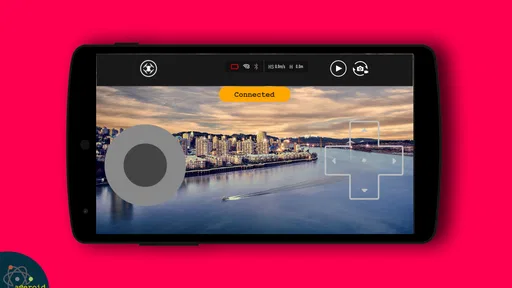
Once you’re all set up, you’ll be amazed at the features packed into this app. There’s a live video feed option that lets you see exactly what your drone sees. It’s like taking a bird’s-eye view tour without leaving your backyard. Plus, the app includes customizable controls, so you can tweak the settings to suit your flying style. Whether you’re a speed demon or a cautious cruiser, there’s a setup that’ll match your vibe.
Another cool feature is the autopilot mode. It’s perfect for beginners who are still getting the hang of things or for those moments when you just want to sit back and enjoy the view. Just set your path, and the drone does the rest. It’s like having an invisible hand guiding your flight.
User Experience and Interface
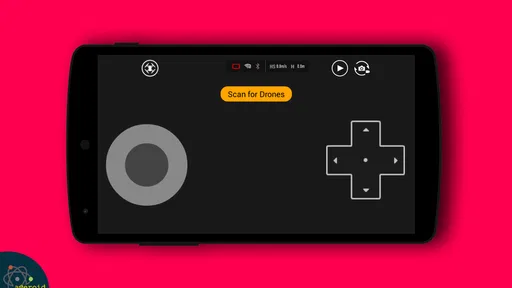
The interface is sleek and user-friendly. Everything is laid out logically, so you’re not left scratching your head trying to find a specific function. The buttons are responsive, and the app rarely lags, which is crucial when you’re trying to avoid obstacles mid-flight. I love how the app provides real-time feedback on your drone's status, like battery life and signal strength. This way, you won’t find yourself in a sticky situation with a dead drone miles away.
Even with status information on screen, I would treat it as a prompt to make a decision, not a guarantee that a flight is safe. Before takeoff, I would check the aircraft itself, confirm that the phone has enough charge for the planned session, and keep the drone within a sensible, visible range. I would also avoid changing control settings in the middle of a flight: testing adjustments on the ground makes it easier to understand what has changed and reduces the chance of a surprise response in the air.
Connecting with the Community
What’s really exciting is the app’s community feature. You can tap into a network of fellow drone enthusiasts, share your experiences, and even get tips from seasoned pilots. It’s like having a support group that’s just as passionate about flying as you are. There are forums where you can post questions or share your most epic drone videos. Trust me, once you start connecting with others, it takes the whole drone experience to a new level.
For a new pilot, the most useful way to approach a community is to bring specific questions rather than rely on broad advice. If a connection step is unclear, describing the drone and what happens on screen is more likely to lead to a useful answer than asking whether the app “works.” I would also treat other users’ flight suggestions as ideas to verify, not as a replacement for safe practice or the instructions for my aircraft.
What the current release tells me
The app is developed by AIOO inc and is listed in the libraries and demo part of the app world, which fits a utility whose main purpose is demonstrating phone-based drone control. Its current version is 25.0, and it first appeared on May 28, 2019. That history suggests the product has had time to evolve, but version numbering alone cannot tell me which controls or compatibility improvements changed along the way. I would judge it by how well it works with my specific drone today, rather than assume a particular feature arrived in a particular update.
For existing users, a newer version can be a reason to check whether the app still opens and connects as expected after an update, especially before an outing. I would not update moments before a planned flight without time to test the setup again. If the current arrangement is dependable, a quick ground check after any software change is a sensible habit; if something behaves differently, I would postpone flying until I understand the new behavior.
The app is free, rated for Everyone, and has an average rating of 4.2 from around 18,000 ratings, with about 2,100 written reviews. It has been installed over 500,000 times and runs on Android 4.4 or later. Those figures show that it has reached a substantial audience, but they cannot settle the key question for an individual pilot: whether its control method suits their drone, phone, and comfort level. I would use popularity as context, not as proof of compatibility or flight reliability.
Where I would be careful
A phone is not an ideal flight tool in every situation. Bright outdoor light can make any screen harder to read, while notifications, incoming calls, or a low battery can interrupt the attention a pilot needs. I would prepare the phone before takeoff, keep the display easy to see, and avoid relying on a screen-based control setup for a demanding flight if I have a controller that feels more dependable.
I would also be wary of treating features such as an autopilot option as permission to stop paying attention. Automated movement still needs supervision, and the area around the drone can change while it is flying. A clear route and an open space matter more than the convenience of setting a path. For someone who wants hands-off operation, dependable obstacle handling, or professional-grade camera control, a purpose-built drone system may be a better fit than a general phone remote.
Another trade-off is that learning to fly well takes more than installing an app. I would begin with basic movements in a safe, open location, keep flights short while learning, and make one adjustment at a time. That approach helps separate a control issue from a piloting mistake. It also makes the app’s interface easier to evaluate: if a button is hard to find or a response feels inconsistent during simple practice, I would not discover that for the first time over a crowded or difficult location.
Who should choose it—and who should not
I can see this being most useful for a casual drone owner who wants to explore phone control, is comfortable learning through a careful setup process, and can verify that their aircraft is supported. It may also appeal to someone who wants to experiment with a demo-style control app before deciding whether a phone-based workflow feels natural. The low financial barrier makes that exploration easier, but it does not remove the need to check compatibility first.
I would skip it if I needed guaranteed support for a particular drone and could not confirm that support, if I depended on highly precise physical controls, or if I wanted the app to replace training and careful flight habits. A beginner who has never flown may find the interface approachable, but that is not the same as making every flight automatically simple. In that case, I would learn the aircraft’s basic controls on the ground and start with conservative, visible flights rather than trusting automation to do the thinking.
Ending Thoughts
In a nutshell, the Drone Remote Control app is a game-changer for both newbie flyers and seasoned drone pilots. It’s packed with features that make flying easy, fun, and safe. Whether you’re using it for serious aerial photography or just to explore the skies, this app is your go-to co-pilot. So, if you’re ready to elevate your drone game, give it a whirl. You won’t be disappointed!
My more measured recommendation is to treat it as an option to test, not a universal replacement for a drone’s own controller. Its age rating and free price make it approachable, and its focus on remote control is easy to understand, but the right choice depends on a successful connection and controls you can use confidently. If those pieces fall into place, it could suit uncomplicated recreational sessions. If not, the manufacturer’s app or a dedicated controller is the safer, more sensible route.
Pros
- User-friendly interface for easy navigation.
- Compatible with various drone models.
- Real-time video streaming feature.
- Customizable control settings.
- Secure connection for stable flights.
Cons
- Requires stable internet for optimal performance.
- Limited to newer smartphone models.
- Battery drain is relatively high.
- Some features require in-app purchases.
- May have connectivity issues in remote areas.
FAQs for Drone Remote Control
What are the main features of the Drone Remote Control app?
The Drone Remote Control app offers a range of features including live video streaming, intuitive flight controls, GPS tracking, and real-time telemetry data. Users can also access automated flight paths, customizable joystick settings, and various camera modes to enhance their flying experience. The app is designed to be user-friendly, making it suitable for both beginners and experienced drone pilots.
Is the Drone Remote Control app compatible with all drone models?
The app is compatible with a wide range of popular drone models, but not all. It’s essential to check the compatibility list provided by the developers to ensure your specific drone model is supported. Compatibility depends on the drone's hardware and software capabilities, so verifying this information before downloading is crucial.
Does the app require an internet connection to function?
While the Drone Remote Control app does not require a constant internet connection to operate the drone, certain features such as map integration and firmware updates will need internet access. For basic flight operations, the app can function offline, but it’s recommended to connect to the internet for the best experience and to access all available features.
Can I use the app to record and save flight videos and photos?
Yes, the Drone Remote Control app allows users to capture high-quality videos and photos during flights. You can save your media directly to your device or an SD card, depending on your drone’s capabilities. The app also provides options for editing and sharing your footage on social media platforms, making it easy to showcase your aerial photography.
Are there any safety features included in the app?
The Drone Remote Control app includes several safety features to ensure a secure flying experience. These features may include return-to-home functionality, no-fly zone alerts, and low battery warnings. Additionally, the app often provides tutorials and tips for safe flying practices, which are particularly useful for novice drone operators.


